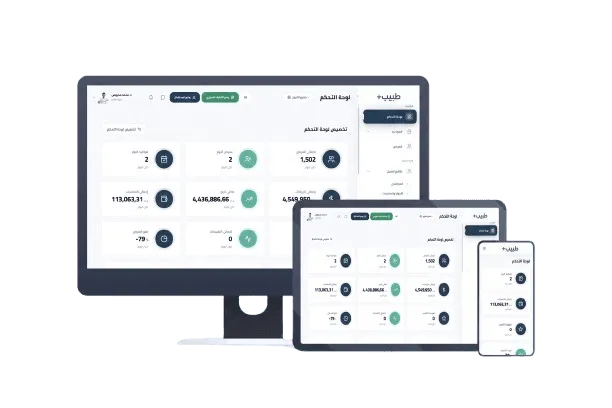
Quick answer: what is the best clinic management software in Cairo?
If you run a clinic or medical center in Cairo, you need one cloud system that unifies four things that cannot practically be separated: appointment scheduling, an electronic medical record per patient, billing and insurance, and post-visit follow-up.
In short: Tabeeb+ is an Arabic-language cloud platform for clinics and medical centers that brings appointments, medical records, e-prescriptions, and billing into one system. It runs on any browser or phone and issues e-invoices compatible with Egypt's e-invoicing framework. Plans start at 500 EGP per month (Solo), with a 7-day free trial and no credit card required.
What is clinic management software?
Clinic management software is a system that runs a medical facility's administrative and clinical work in one place, instead of scattering it across an appointment book, paper charts, invoices, and WhatsApp messages. The core idea is simple: every step in the patient journey — booking through collection and follow-up — becomes a recorded step inside the system, rather than something a staff member has to remember or find on a page that may have been lost.
The administrative layer
Appointments, reception, insurance billing, payments, expenses, inventory, staff attendance, and management reporting.
The clinical layer
The electronic medical record, coded diagnoses, e-prescriptions, labs and imaging, and scheduled follow-up for chronic conditions.
The communication layer
WhatsApp reminders, booking confirmations, self-scheduling, patient satisfaction surveys, and post-visit follow-up.
Why Cairo clinics need a real digital system
Cairo is Egypt's largest private healthcare market and has the highest density of multi-specialty clinics and medical centers where more than one doctor works at the same time. That density is exactly what makes paper administration fail: a single ledger cannot know that a doctor is booked in two rooms simultaneously, or that a patient seen in Maadi last month has three prior visits that were never transferred to the branch she is visiting today.
The same doctor, multiple branches
A dentist working in Nasr City and Maadi on the same day. Paper cannot separate the branches; software separates schedules, files, and reports while still unifying the numbers.
The queue before the consultation room
A long wait is a coordination problem, not a space problem. A digital calling screen moves the patient to the room in a clear order everyone can see.
No-shows without notice
A last-minute cancellation is paid-for doctor time and eroding patient trust. Automatic WhatsApp reminders are the cheapest, fastest intervention available to a clinic.
Handwritten prescriptions
Illegible handwriting can be misread by the pharmacist. Electronic prescriptions with specialty templates remove that path entirely.
Denied insurance claims
A diagnosis without a code, a code without a report, or a report without pre-approval equals a denied claim. Linking the medical file to billing produces a complete claim file the first time.
E-invoicing and tax compliance
Egypt's e-invoicing framework is no longer optional. An e-invoice with a tax number and verification code is the basis of compliance, not an add-on for later.
Core features: medical records and prescriptions
This is the layer a doctor touches every day. If it is slow, or split across more than one program, no other capability in the facility will matter.
Electronic medical record
A unified file per patient containing every previous visit, diagnosis, procedure, imaging and lab result, medical history, and allergies — found in seconds from any device.
E-prescriptions
Create and print prescriptions from ready templates per specialty, with drug interaction and allergy alerts. Handwriting and its misreading are eliminated.
Lab and imaging archiving
Upload and link lab and radiology results directly into the patient file, instead of a photo on a personal phone and a scan that never happens.
Coded diagnoses
Documenting a diagnosis with a standard code is what makes accurate insurance billing and claims possible, because the code is the shared language every party reads.
Chronic disease management
Scheduled follow-up for diabetic and hypertensive patients, with automatic appointment and medication reminders per patient.
Digital consent and intake forms
Patients sign consent and intake forms on a tablet, instead of stamped paper that gets misplaced in the file.
Core features: appointments and scheduling
Scheduling is the highest-friction point between the patient and the clinic. Every lost minute becomes either a complaint or a no-show. That is why scheduling is treated as a full workflow, not a wall calendar.
Electronic appointment agenda
Doctor and branch calendars with automatic double-booking prevention, plus waitlists and urgent slots that can be inserted between scheduled visits.
Automatic WhatsApp reminders
Booking confirmations and pre-appointment reminders via WhatsApp — the channel Egyptian patients actually respond to, unlike email.
Online self-scheduling
A booking link for your website or social pages lets patients book on their own, any time, instead of waiting for someone to answer the phone at peak hour.
Waiting-room screens and calling
A reception display with audio or visual calling moves the patient when it is their turn, replacing the confusing shouted name.
Visiting-doctor scheduling
Coordinating visiting consultants and shared clinic space — the normal situation in clinics where more than one doctor uses the same premises.
Core features: billing, insurance, and finance
This layer decides whether a clinic actually profits, or grows revenue while losing collections. Most clinic financial problems are system and follow-up problems, not a shortage of patients.
Medical billing and e-invoicing
Itemized invoices that separate consultation, procedure, and follow-up fees, with copays, offers, and insurance calculated automatically at issue time.
Egyptian e-invoicing compliance
Invoices issued with a tax number and verification code compatible with the Egyptian Tax Authority framework, which underpins tax refunds and simpler reviews.
Health insurance and claims
Contracts, pre-approval, copay ratios, and the patient's policy inside the medical file, with reports on submitted claims and the reasons for denials.
Doctor revenue splits
Calculate a doctor's or partner's share after deducting consumed materials and actual cost — automatically at month end, not by hand in a ledger.
Expenses and cashbox
Rent, salaries, utilities, and operating costs with daily balances, so the owner knows true net profit rather than just total collections.
Inventory and expiry alerts
Supplies and medicines with an alert before an item runs out or nears expiry — direct protection against wasted money.
Treatment packages and sessions
Multi-session treatment packages tracking consumed and remaining sessions in the patient's account, replacing a paper package book that gets lost.
Core features: operations and security
What makes a system actually work in a busy clinic is not the length of the feature list, but how much of it your team uses daily. These are the basics that make adoption possible and sustainable.
Roles and permissions
Each user sees only what their role requires: reception sees appointments, a doctor sees their patients, management sees the numbers. Not everyone sees everything.
Audit trail
A record of who changed what and exactly when — legal protection for the clinic and privacy for medical records.
Automated cloud backups
Periodic cloud backups of your data, so a hardware failure or unexpected incident cannot wipe out a clinic's records.
Lab and radiology integration
Send test requests electronically and receive results inside the patient file instead of waiting for a late paper report.
Staff attendance
Track team attendance and shift schedules — the basis for any commission or working-hours calculation.
Patient portal and telemedicine
A patient portal for follow-up, booking, and reading results, plus video consultations for cases that do not require an in-person visit.
Solutions by medical specialty
The engine is the same, but the interface, templates, and fields a doctor fills in change with the specialty. Each specialty has a page on our site explaining its workflow in detail, so you can review the closest match to your clinic directly.
Dentistry
Interactive dental charting, multi-visit treatment plans, and e-prescriptions.
Pediatrics
Growth curves, vaccination schedules, and assessment scores.
OB/GYN
Antenatal follow-up, gestational age, and a continuity-of-care card.
Dermatology & Aesthetics
Before-and-after imaging, laser sessions, and package tracking.
Orthopedics
Post-operative follow-up, imaging, and medical reports.
General Practice
Chronic conditions, prescriptions, and lab requests.
Ophthalmology
Refraction measurements, lenses, and intraocular pressure.
Physiotherapy
Therapy sessions, range of motion, and therapist reports.
Psychiatry
Session documentation with full privacy and a restricted record.
Nutrition
Custom diet plans and body composition measurements.
Cardiology
ECG recording and cardiovascular risk indicators.
Surgery
Procedure booking with pre-operative and post-operative follow-up.
Solutions by clinic size
The question we hear most: does the Solo plan cover a clinic with four doctors and two branches? A plan is determined by doctor count and branch count together, not by either alone, and by whether you have a receptionist who needs independent permissions.
Solo practitioner
One doctor, no staff — needs a digital file, appointments, and billing. The Solo plan covers exactly this.
Small clinic
One or two doctors with a receptionist. Usually starts on Solo, and remains sufficient until the doctor count grows.
Multi-doctor clinic
Three or more doctors, or multiple specialties. Needs the Clinic plan to connect teams, schedules, accounts, and performance reporting.
Medical center
Several departments with inventory, imaging, and labs. The Clinic plan with inventory and advanced reporting enabled.
Branch network
More than one branch in Cairo or beyond. The Enterprise plan to run branches from a single control center with unified numbers.
Running a clinic in Cairo: what it means in practice
Running a clinic management system in Cairo is not a copy of running one in Alexandria or Riyadh. The channel patients actually answer on, the geographic spread of the clinic, and the realities of insurance and e-invoicing all differ — and those differences are what a system has to actually handle.
WhatsApp is the primary channel
Confirmations and reminders over WhatsApp are what actually move in the Egyptian market. Relying on email or SMS alone leaves a large share of patients outside your reach.
Geography splits your clinic
Many clinics operate across more than one branch: Nasr City, Maadi, New Cairo, Heliopolis, Dokki. The system separates branches for schedules and files, and unifies the numbers into one management report.
Doctors may be attached to several sites
Visiting consultants and part-time schedules create a timetable that will not hold on a paper wall. Modern scheduling handles this without pushing extra paperwork onto the doctor.
Insurance is part of daily reality
A share of Cairo patients arrive with insurance or a contract. Handling claims, pre-approvals, and copays inside the system turns a recurring source of complaints into steady revenue.
E-invoicing and tax compliance
Egyptian clinics are bound by the e-invoicing framework. Those who organize it on day one do not face a paper backlog at their first tax review; those who defer it pay a large conversion cost later.
Competition rewards better service
Every clinic in Cairo is considering digitization right now. Delaying is not a neutral commercial decision — it hands your competitor more conversions.
The patient journey in the system: booking to follow-up
The easiest way to evaluate any clinic system is to follow one patient from the first call to the last message after treatment. That journey is what ultimately determines whether the system saves your administration time or adds another step to it.
Booking the appointment
The patient calls or books through the self-scheduling link. The appointment is recorded in the doctor's calendar and a WhatsApp confirmation is sent immediately.
Reception and registration
Reception opens the patient file, checks the last visit, the account balance, and insurance validity, then prepares the consultation.
Consultation and documentation
The doctor records a coded diagnosis, writes consultation notes, issues the e-prescription, and requests any labs from inside the file.
Billing and collection
Invoices are generated from the services recorded in the visit, with copay calculated, and issued with a tax number and verification code.
Follow-up and reminders
For chronic cases the next appointment is scheduled automatically and a reminder is sent. A satisfaction survey goes out once treatment is complete.
E-invoicing in Egypt: what a Cairo clinic needs
Egypt's e-invoicing framework is imposed by the Tax Authority on issued invoices; it is not an optional project. Because Cairo clinics deal with patients from insurance companies and corporate clients, the tax number and verification code have become a condition for tax refunds and for settling claims.
Simplified versus standard invoices
A simplified invoice is issued to the patient at payment and carries a verification code. A standard invoice goes to insurance companies and corporates, and requires the tax number and national address.
Mandatory fields on every invoice
The system fills the mandatory fields and issues the invoice from inside the file rather than later by hand, because manual re-entry is a common source of tax errors.
Linking the invoice to the visit
Every line on the invoice is tied to a recorded service and visit date, which makes review faster and any dispute traceable.
Effect on electronic transactions
E-invoicing organizes transactions with pharmacies and labs, and narrows the gap between what is recorded in the file and what is actually collected.
Health insurance in Egyptian clinics
Many Cairo patients arrive with insurance or under a contract. That means clinic administration does not end at the consultation room door: it extends to a claim submitted, a pre-approval requested, and a settlement collected. What most often breaks this path is a diagnosis recorded in the file that is not connected to the billing file, so each party receives different data.
Pre-authorization
Before any costly procedure a pre-approval request is submitted and the approval number is stored in the patient file. Without it, a claim is denied regardless of clinical strength.
Copay and coverage
The share the patient pays differs from the full invoice value, and calculating it by hand every time is a recurring source of errors.
Connecting the file to the claim
When services and reports sit in the same file, the claim is complete the first time and incomplete claims drop noticeably.
Following up denials
A denial is not the end of a claim. Keeping the reason turns resubmission into an organized step rather than a lost task.
When you do not need a clinic management system
Being honest in this field means naming the cases where a system is not worth its cost. If your practice is a single doctor seeing ten patients a day with no billing, no insurance, and no reporting needs, a full system may be a burden rather than a help. Equally, there are clear signs that the time to switch is now.
Pros
- More than one doctor working at the same time or across more than one branch
- Part of your income depends on health insurance or corporate contracts
- No-shows repeat often enough to cost real doctor time
- You lose time chasing denied claims with no recorded reason
- You want to follow revenue and expenses in real time
- You need organized data to expand or bring in an investor
Cons
- A single doctor seeing a small number of patients a day, with no insurance
- No need for itemized billing or management reporting
- No receptionist who needs independent permissions
- The goal is simple appointment scheduling, with no electronic medical record
- A very limited budget where the goal is a short trial, not a commitment
Moving from an old system or from Excel
The biggest reason clinics delay digitization is not price, but fear of losing what already exists: patient lists, invoice history, and collection figures. That fear is mostly unfounded, but it needs a practical answer.
What can be moved?
Patient lists and their core data, service and price lists, appointment history, and previous account statements. All of it can be imported.
Where does the move start?
From an Excel file with clear columns. The better organized the file, the faster the import, and our team can help you structure it first.
What happens during the move?
Setup is done on a trial basis so the figures can be verified, and during that period you can keep running the clinic as usual so service does not stop.
What about old paper charts?
Paper files are not digitized all at once. The usual approach is to enter chronic and active cases first, then complete the rest gradually in priority order.
Who performs the move?
Our team assists with setup step by step, and the training included with go-live covers your reception staff on daily entry.
What to ask for in a demo
A demo is your only chance to test a system on your own case rather than on the seller's case. These are practical questions to ask in any demo, including ours.
- Ask them to open a test patient file in front of you and record a full visit end to end
- Ask how many steps it takes to open an old patient file and read the full history
- Ask to see an electronic invoice that includes an insurance copay and a tax number
- Ask how double-booking is prevented, and what happens if staff try to book a taken slot
- Ask about exporting your data: can I take a full copy, and when
- Ask what happens to the clinic if the internet drops or a device fails
- Ask to see permissions for a receptionist who can only see their own function
- Ask what migrating from your current system costs, and who covers it
- Ask about support response times, and who answers
Common mistakes when going digital
Most failed implementations did not fail because of the product, but because of how it was adopted. These are the most common mistakes we see in clinics that switched and then stopped using the system a few months later.
Starting before services and prices are configured
If services and prices are not entered accurately first, every invoice after that will be wrong and the owner will be reading incorrect figures.
Leaving the team without hands-on training
A one-hour walkthrough is not enough. Training on a real case from your own clinic is the difference between daily use and an abandoned system.
Letting everyone see everything
Open permissions for everyone mean the medical file is effectively unprotected. Set roles properly from day one.
Running the paper ledger in parallel for months
Operating the system and the ledger together creates two sources of truth, and the disagreement between them costs trust before it costs time.
Ignoring data cleanup before the move
A duplicated or messy file imports exactly as it is. Cleaning up before the move is time saved afterwards.
Not asking for help at the first problem
The first issue is usually simple and solved in minutes with support, but silence turns it into a large one.
Manual vs. digital clinic management
The table below compares differences in day-to-day working behavior, not marketing figures. Many numbers quoted when comparing software are measured by nobody; the differences in these areas, however, are observed by everyone who has worked in a clinic.
Practical differences between paper, booking apps, and full clinic systems
| Aspect | Paper administration | Booking or WhatsApp app only | Full clinic management system |
|---|---|---|---|
| Appointments | A ledger with manual edits | A simple calendar with no medical file | Branches, conflict prevention, and reminders |
| Patient records | Scattered papers | None | A unified digital file with full history |
| Prescriptions | Handwritten | None | E-prescriptions with templates and alerts |
| Billing | Manual calculation | Usually unavailable | Billing, copays, and insurance |
| E-invoicing | Not available | Not available | Compatible with the Egyptian framework |
| Insurance claims | Paper files | Not available | Linked to the file and pre-approval |
| Patient reminders | A phone call, or nothing | A confirmation message only | Confirmation, reminder, and follow-up |
| Reporting | Days assembling numbers | No reporting | Real-time operational and financial reports |
| Inventory and expenses | Not tracked | Not available | Inventory, expenses, and cashbox |
| Data safety | Loss or misplacement | Data on a personal device | Permissions, audit trail, and backups |
| Mobile access | Not available | Available | Available to every authorized role |
| Expanding to branches | A separate system per branch | Not available | A new branch inside the same account |
Pricing and plans in Egypt
Prices are quoted in Egyptian Pounds, which is the currency Cairo decision-makers actually evaluate in. Full details of what each plan includes are on the pricing page.
Tabeeb+ plans in EGP by clinic size
| Plan | Monthly (EGP) | Best for | Key inclusions |
|---|---|---|---|
| Solo | 500 | One doctor or one clinic | Medical records, appointments, e-prescriptions, billing |
| Clinic | 1,000 | A multi-doctor clinic or center | All of the above, plus connected doctors and branches and advanced reports |
| Enterprise | 1,500 | A medical center or branch network | Unlimited doctors and branches, with analytics and customization |
Tabeeb+ plans are priced in EGP: from 500 EGP per month for Solo, 1,000 EGP for Clinic, and 1,500 EGP for Enterprise. What each plan includes and whether it fits your clinic's size are shown clearly on the pricing page — with a 7-day free trial before any commitment.
Data security and privacy
Medical records are highly sensitive data, and protecting them is a basic requirement of practice, not an extra feature. At the platform level, the system provides:
- Precise access permissions: each staff member sees only what their role requires, and every file opened or changed is logged with a timestamp.
- Encryption in transit and at rest using AES-256 on secure servers.
- Automated cloud backups, so a hardware failure cannot lose your clinic's records.
- Full ownership of your data: you can export it at any time.
- Documented privacy and data protection commitments — see the Compliance and Security pages for full details.
How to get your Cairo clinic running on Tabeeb+
Four practical steps. Most clinics complete setup within a single working day, and the team is trained within that period with no prior technical experience required.
Register and reserve your clinic URL
Sign up in 60 seconds with no credit card; your clinic dashboard link activates immediately.
Set services and price lists
Add consultation types, procedure prices, doctor timetables, and working hours so billing is accurate from the first invoice.
Import patients or start fresh
Import your existing patient list from an Excel file, or start registering new patients digitally right away.
Go live and train the team
Start managing appointments and visits, with free training and ongoing Arabic technical support via WhatsApp and phone.
How to choose clinic management software in Cairo
A practical checklist you can apply to any system, including this one, before signing up or even during a free trial:
- Is Arabic native, or translated from another language?
- Does it include a real electronic medical record, or just text notes?
- Can it manage multiple doctors and multiple branches in the same account?
- Does it issue invoices compatible with Egypt's e-invoicing framework?
- Does it support WhatsApp reminders, and are they on by default?
- Can you export your full data set if you leave later?
- What does migrating from your current system cost, and how long does the data transfer actually take?
- What after-sales support exists, in which language, and how fast is the response?
Key things to know
Key Takeaways
- Clinic management software saves administrative time and reduces no-shows and double-bookings.
- The most important technical decision is not the specialty, but having appointments, records, and billing in one system.
- E-invoicing and insurance in Egypt are not add-ons; they are part of running a clinic every day.
- The best system is the one your whole team adopts, not the one with the longest feature list.
- Start with a 7-day trial on your real data so you can evaluate before any financial commitment.
Frequently Asked Questions
What is the best clinic management software for clinics in Cairo?
The best is one that unifies appointments, medical records, e-prescriptions, and billing in a single Arabic cloud system, with WhatsApp reminders and Egyptian e-invoicing. Tabeeb+ provides this with a 7-day free trial.
How much does clinic management software cost in Egypt?
Tabeeb+ plans start at 500 EGP per month for Solo, 1,000 EGP for the Clinic plan, and 1,500 EGP for Enterprise. See the pricing page for full details.
Is there a free trial?
Yes — 7 full days with all features, and no credit card required.
Can I manage multiple doctors?
Yes. You start with one doctor and can then add doctors, schedules, and files without changing the system or losing your data.
Can I manage multiple branches?
Yes. Multiple branches are integrated in the higher plans and managed from a single account with unified numbers.
Does the system support Arabic?
Yes — native Arabic with English support, including the interface and prescription templates.
Can I manage patient appointments?
Yes — with automatic double-booking prevention, WhatsApp reminders, a waiting-room screen, and self-scheduling.
Can I store medical records?
Yes — a unified electronic file per patient containing visits, diagnoses, labs, imaging, and prescriptions.
Does it support dental clinics?
Yes, with interactive dental charting and multi-visit treatment plans. See our Dentistry page for details.
Does it support pediatric clinics?
Yes, with growth-curve and vaccination tracking. See our Pediatrics page.
Can I manage clinic finances?
Yes: billing, insurance, doctor revenue splits, expenses, cashbox, and inventory.
Can I track patient balances?
Yes — each patient account shows the amount paid, the remaining balance, and insurance-owed amounts.
Does it support WhatsApp notifications?
Yes — automatic confirmations and reminders before the appointment.
Is the system accessible online?
Yes — fully cloud-based, running on any browser or phone with no installation and no special hardware.
How can I register?
Click the start button at the top of the page, or request a demo. Both are free and carry no commitment.
What support is available?
Arabic technical support and free training at go-live, via phone, WhatsApp, and email.
Can I migrate my existing data?
Yes — import your patient list from an Excel file within minutes, with team assistance during setup.
Are invoices compatible with the Egyptian Tax Authority?
Yes — the system issues an e-invoice with a tax number and verification code compatible with the Egyptian framework.
Do I need technical expertise?
No. The Arabic interface is straightforward and training is included; most teams are running within a day.
Do I need a full system, or is a WhatsApp booking app enough?
A booking app schedules appointments only, with no medical file, billing, or reporting. It works as a first step for a single doctor without insurance, but it does not replace a full system once you have doctors, branches, or insurance.
Why does e-invoicing matter for a Cairo clinic?
Because e-invoicing in Egypt is a framework the Tax Authority imposes. Cairo clinics also deal with insurance companies and corporates that require an invoice with a tax number and verification code. Issuing it from inside the system keeps it accurate and linked to the visit.
How does the system handle denied insurance claims?
The system keeps the denial reason inside the patient file, so resubmission or appeal becomes an organized step instead of searching for the cause again each time.
What happens if the clinic loses internet?
Core work continues on a single device following the operating plan agreed with support, and automated cloud backups protect your data from hardware failure.
Can I export my data if I leave the system later?
Yes. You own your data fully and can export it at any time. That is a right, not an extra feature.
Is the system suitable for a dental clinic in Nasr City?
Yes. Dentistry is among the most strongly supported specialties, with interactive dental charting and multi-visit treatment plans. See the Dentistry page for details.
Does the price vary by clinic size?
Yes. Plans map to size: one doctor, a multi-doctor clinic, or a center with branches.
Read also
Read also
Try Tabeeb+ Free
Start your free trial and turn your clinic into a smart digital system.
Launch Your Cloud Clinic Free